- Home Page /
- Mobile Phone Accessories /
- Mobile Phone Accessories /
- Maintenance, Upkeep & Repairs /
- Replacement Parts /
- Screens /
- for Motorola Moto G04 / G24 / G24 Power LCD D...
0 ratings


Item #:
143739482
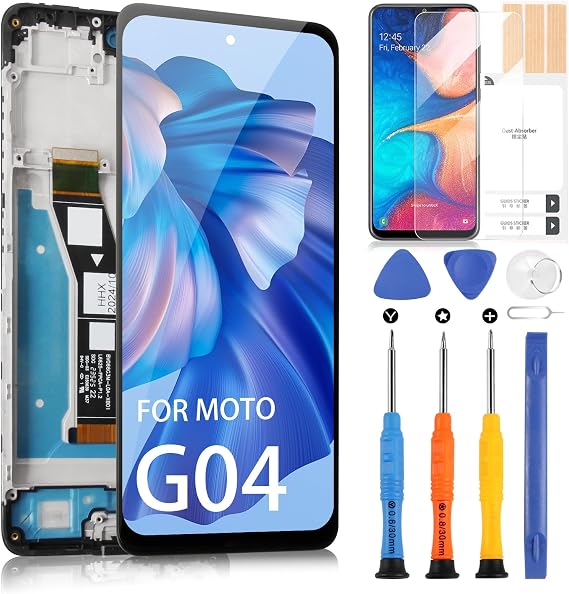
for Motorola Moto G04 / G24 / G24 Power LCD Display - for Moto G04 LCD Touch Screen Replacement for Motorola G04 XT2421-2 XT2421-3 XT2421-8 XT2423-1
Item #:
143739482
KYD 34
Price Details
Excluding Shipping & Custom charges ( Shipping and custom charges will be calculated on checkout )
*All items will import from US
0 ratings
Write a review
In stock
 Imported from USA store
QTY:
Order now and get it around Saturday, October 03
Secured transaction
Ubuy works hard to protect your security and privacy. Our advanced payment security system ensures confidentiality by encrypting your information during transmission using AES (Advanced Encryption Standards) and SSL (Secure Socket Layer) protocols. Your payment details are 100% secure as we do not share your payment details with third party sellers.
Our Top Logistics Partners


Adhering to these guidelines will minimize potential issues during the screen replacement process, ensuring your phone emerges refreshed and fully functional.

Fast
Shipping

Free
Return*

Secure Packaging

100% Original Products

PCI DSS Compliance

ISO 27001 Certified



What Stands Out
High-Quality LCD
Experience vibrant colors and sharp images with the premium LCD that enhances your viewing experience, ensuring clarity whether you're watching videos or browsing the web.
Easy Installation
The LCD display kit includes everything you need for a simple and hassle-free installation, making it accessible for both professionals and DIY enthusiasts.
Compatibility Assurance
Designed specifically for Motorola Moto G04 models, this replacement ensures a perfect fit and functionality, restoring your device to its original performance without compromise.
Product Details
| Package Dimensions | 7.64 x 4.06 x 1.18 inches (19.4 x 10.3 x 3 cm) |
| Item Weight | 5.6 ounces (158.76 grams) |
| Item model number | for motorola moto g04 lcd |
| Other display features | Wireless |
| Whats in the box | for motorola moto g04 lcd |
| Manufacturer | ARSSLY |
| Date First Available | February 20, 2025 |
Who Should Buy?

-
DIY Enthusiasts
Tech-savvy individuals who enjoy repairing their devices can successfully use this replacement screen with assembly kit.
-
Budget-Conscious Users
Users looking to save costs on phone repairs will appreciate the affordability of this aftermarket LCD display.
-
Moto G Series Owners
Owners of Motorola Moto G04, G24, or G24 Power needing a display replacement will find this product fits perfectly.

-
Non-Technical Users
Individuals without technical skills or tools should avoid this product as installation may be complex and challenging.
Product Description
for Motorola Moto G04 / G24 / G24 Power LCD Display - for Moto G04 LCD Touch Screen Replacement for Motorola G04 XT2421-2 XT2421-3 XT2421-8 XT2423-1 Digitizer Glass Assembly Kit (with Frame)
Have any Query? Chat with us
Customer Questions & Answers
-
Question:
What is included in the Moto G04 LCD Touch Screen Replacement kit?
Answer: The Moto G04 LCD Touch Screen Replacement kit includes the LCD display, digitizer glass assembly, and frame, providing everything you need for a complete replacement. This all-in-one assembly simplifies the repair process for users who want to restore their phone's visual performance. It's particularly useful if you have a scratched screen or a display that has malfunctioned due to damage, ensuring your device looks and works like new. -
Question:
Is this LCD display compatible with all Moto G04 models?
Answer: Yes, this LCD display is specifically designed for several models of the Moto G04 series, including the XT2421-2, XT2421-3, XT2421-8, and XT2423-1. To ensure compatibility, always verify your model number before purchasing. Using a compatible display will ensure optimal performance and maintain the integrity of your device, avoiding issues that may arise from mismatched parts. -
Question:
How do I install the new LCD screen on my Moto G04?
Answer: Installing the new LCD screen involves careful steps, starting with turning off the device, removing the back cover, and carefully detaching the old screen. After that, connect the new LCD assembly and secure it within the frame. Following detailed online tutorials can provide visual guidance. Proper installation is crucial to avoid future display issues, and it can be a rewarding DIY project for tech-savvy users. -
Question:
Will I lose my data if I replace the LCD display?
Answer: No, replacing the LCD display does not affect the data stored on your device. The LCD assembly primarily deals with the display feature, leaving your files, contacts, and settings intact. However, as a best practice, it's advisable to back up your data before starting any repair to safeguard against unexpected issues during the process. -
Question:
What should I do if the touch functionality doesn’t work after installation?
Answer: If the touch functionality doesn't work after installation, first ensure that all connections are secure and properly seated. Occasionally, a loose connection might cause touch issues. If everything appears connected correctly, try rebooting your device. If the problem persists, the new LCD component might be defective, and further troubleshooting may be necessary. Opting for a quality replacement can prevent such concerns. -
Question:
How can I ensure the quality of the replacement LCD display?
Answer: To ensure quality, purchase from reputable sellers and check product reviews before buying the LCD display. Look for displays that offer high resolution and sensitivity to touch. Quality screens reduce the likelihood of issues like dead pixels or color distortion, giving your Moto G04 a vivid and responsive experience, which is essential for enjoying media and applications. -
Question:
Can I use my Moto G04 while waiting for the new LCD display to arrive?
Answer: If your current LCD is cracked or malfunctioning, it may be difficult or impossible to use your Moto G04 effectively until the new display arrives. However, if the touch input still works despite the damage, you might temporarily use it with caution. Using a screen protector can help prevent further damage while you wait for your replacement, allowing you to manage calls and notifications. -
Question:
What tools do I need for the LCD screen replacement?
Answer: For the LCD screen replacement, you typically need a small Phillips screwdriver, a wedge tool or plastic prying tool, and tweezers. Some kits may come with these tools included, which simplifies the process. Having the right tools is important as it allows for careful handling of delicate components, reducing the risk of damage during the installation process. -
Question:
Is it worth replacing the LCD display on an older Moto G04?
Answer: Yes, replacing the LCD display can extend the life of your Moto G04, making it a cost-effective choice compared to purchasing a new device. If the phone still meets your operational needs and has no other significant damage, replacing the screen allows you to enjoy the functions you need without the expense of a new smartphone. It’s a practical solution for maintaining your device. -
Question:
Where can I buy the Motorola Moto G04 LCD display replacement in Cayman Islands?
Answer: You can purchase the Motorola Moto G04 / G24 / G24 Power LCD Display Replacement from Ubuy in Cayman Islands. Ubuy offers a range of replacement parts, ensuring you find the right components for your device. With easy navigation and a focus on quality products, Ubuy makes it convenient to source compatible parts, ensuring you have what you need for a successful repair.
ARSSLY Screens for motorola moto g04 lcd Editorial Review
No editorial reviews found
Customer Reviews & Ratings
1 customers ratings
-
5 Star
100%
-
4 Star
0%
-
3 Star
0%
-
2 Star
0%
-
1 Star
0%
Review this product
Share your thoughts with other customers
Platform Trust & Buyer Confidence

JK
Jasmin
Verified buyer
“Great products and very good service: very easy and very fast international delivery.”
9 September 2026 · via Trustpilot
AG
Anke
Verified buyer
“Wonderful online shopping experience, smooth transaction from the start. Payment method works conveniently and delivery is unexpectedly fast and reliable. You go the extra mile for service. What makes this even more amazing, you deliver to Namibia. I will remain a happy Ubuy customer and will increase my purchases for sure! Thank you!”
10 September 2026 · via Trustpilot
H
Hazel
Verified buyer
“Very easy to find the products what you need, and so fast delivery, that’s why I highly recommended to others costumers to used ubuy.”
10 September 2026 · via Trustpilot
O
Opaleye
Verified buyer
“I received exactly what I ordered I was skeptical about your site because that was my first time to order. But the order came timely and neatly packaged. I was not disappointed. Thank you.”
11 September 2026 · via Trustpilot
AC
Adele
Verified buyer
“Easy to find and order what you want on the website. Delivery is quick to the UK”
8 September 2026 · via Trustpilot
Secure Checkout
Global Delivery
Easy Returns
Genuine Products
Product Price History
Important information
- Limitations : For products shipped internationally, please note that any manufacturer warranty may not be valid; manufacturer service options may not be available; product manuals, instructions, and safety warnings may not be in destination country languages; the products (and accompanying materials) may not be designed in accordance with destination country standards, specifications, and labeling requirements; and the products may not conform to destination country voltage and other electrical standards (requiring use of an adapter or converter if appropriate). The recipient is responsible for assuring that the product can be lawfully imported to the destination country. When ordering from Ubuy or its affiliates, the recipient is the importer of record and must comply with all laws and regulations of the destination country.
- Not all the products listed on Ubuy are for sale, as Ubuy is a global search engine. Products are subject to export/trade regulations.
KYD 34
Order now and get it around Saturday, October 03
This item is not restrict in my country.(Please click on above link if this item is not restrict in your country, So our team will review and allow.)
QTY:
Secured transaction
PCI DSS compliant and ISO 27001:2022 certified, with encrypted payments and full buyer protection on every order.
Our Top Logistics Partners
Fastest cross-border delivery
Features & Benefits
- Ensure device compatibility before purchase to avoid issues.
- Prepare necessary tools for efficient screen replacement.
- Power off your device completely before disassembly.
- Handle the old screen gently to prevent damage.
- Test the functionality of the new screen prior to reassembly.
- Consider professional help if DIY replacement feels daunting.
Ubuy Assurance
Experience worry-free shopping with 100% original products, PCI DSS-compliant payment security, ISO 27001-certified data protection, the fastest cross-border delivery, free returns *, and secure packaging on every order.