- Home Page /
- Electronics /
- Computer Accessories /
- Computer Accessories & Peripherals /
- Input Devices /
- Digital Pens /
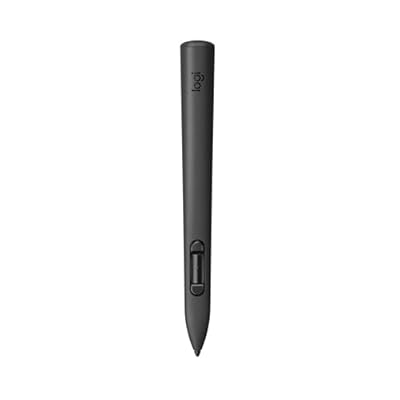
- Logitech MX Ink Mixed-Reality MR Stylus, Wire...
0 ratings

Item #:
129504558
Logitech MX Ink Mixed-Reality MR Stylus, Wireless Pen Controller, high Precision and Pressure Sensitive, Transforming Ideas in MR from 2D to 3D, for
Item #:
129504558
KYD 173
Price Details
Excluding Shipping & Custom charges ( Shipping and custom charges will be calculated on checkout )
*All items will import from US
0 ratings
Write a review
In stock
 Imported from USA store
QTY:
Order now and get it around Saturday, June 27
Secured transaction
Ubuy works hard to protect your security and privacy. Our advanced payment security system ensures confidentiality by encrypting your information during transmission using AES (Advanced Encryption Standards) and SSL (Secure Socket Layer) protocols. Your payment details are 100% secure as we do not share your payment details with third party sellers.
Our Top Logistics Partners


Enjoy the ease and minimalism of wireless charging for your MX Ink MR stylus with this compact charging station.

Fast
Shipping

Free
Return*

Secure Packaging

100% Original Products

PCI DSS Compliance

ISO 27001 Certified


What Stands Out
High Precision
With superior precision and pressure sensitivity, this stylus ensures accurate control for precise 2D to 3D transformations, enhancing your mixed-reality experience seamlessly within environments like Meta Quest.
Wireless Design
The wireless functionality of the MX Ink Stylus provides freedom of movement, allowing users to easily navigate and create without cumbersome wires, offering a modern approach to mixed-reality creation.
Compatibility
Designed specifically for Meta Quest devices, this stylus enhances performance across the latest VR platforms, ensuring optimal functionality and user experience for all Meta Quest users looking to elevate their creativity.
Product Details
| Package Weight | 1 Pound |
Who Should Buy?

-
Digital Artists
Ideal for artists looking to create detailed 3D models and illustrations in a mixed-reality environment.
-
Design Professionals
Perfect for designers who require precise control and pressure sensitivity for advanced prototyping and sketching.
-
Educators & Trainers
Great for educators using mixed reality to teach complex concepts through interactive visualizations and engagement.

-
Casual Users
Not suitable for casual users who only need basic functionalities and do not engage in creative tasks.
-
Budget-Conscious Buyers
May be too expensive for budget-conscious individuals who seek simple and economical drawing tools.
-
Non-Tech Savvy Users
Users who are unfamiliar with mixed-reality technology may find it challenging to fully utilize the product.
Product Description
Logitech MX Ink Mixed-Reality MR Stylus, Wireless Pen Controller, high Precision and Pressure Sensitive, Transforming Ideas in MR from 2D to 3D, for Meta Quest 2, Meta Quest 3, Meta Quest 3S
Have any Query? Chat with us
Customer Questions & Answers
-
Question:
What is the Logitech MX Ink Mixed-Reality MR Stylus used for?
Answer: The Logitech MX Ink Mixed-Reality MR Stylus is primarily designed for mixed-reality applications, offering a high-precision tool to transform your ideas from 2D to 3D. This stylus allows users to draw and write with remarkable accuracy and pressure sensitivity, making it ideal for artists, designers, and engineers who work in digital environments. With its ability to seamlessly integrate with various MR platforms, users can express their creativity and enhance their projects efficiently. -
Question:
How does the pressure sensitivity feature work on the stylus?
Answer: The pressure sensitivity feature of the Logitech MX Ink MR Stylus allows it to detect the level of pressure applied during use. This means that the harder you press, the thicker the line drawn, and vice versa. This feature is crucial for artists and designers who want to achieve varied line thicknesses and shading in their work, providing a more natural drawing experience that simulates traditional drawing tools. -
Question:
Is the Logitech MX Ink MR Stylus compatible with all devices?
Answer: The Logitech MX Ink MR Stylus is compatible with specific mixed-reality platforms and devices that support stylus input. It primarily works with devices designed for mixed reality experiences. To ensure compatibility, check the specifications of your device to confirm it supports MR stylus inputs. This tailored compatibility ensures an optimal user experience on supported devices. -
Question:
Can I use the stylus for regular drawing applications?
Answer: Yes, the Logitech MX Ink MR Stylus can be used for regular drawing applications as well. While it is optimized for mixed-reality environments, its precision and pressure sensitivity allow it to function beautifully with standard art and design software on compatible devices. Artists can leverage its capabilities in applications such as Adobe Photoshop, Illustrator, and various sketching apps to bring their ideas to life. -
Question:
How does the charging dock work for the stylus?
Answer: The charging dock for the Logitech MX Ink MR Stylus is designed for convenience and quick charging. Simply place the stylus in the dock, and it will begin charging automatically. The charging dock typically uses a USB connection, allowing users to keep their stylus powered and ready for use without the hassle of battery replacement. This feature ensures that your stylus is always charged and available for use whenever inspiration strikes. -
Question:
What features contribute to the high precision of the stylus?
Answer: The high precision of the Logitech MX Ink MR Stylus is attributed to its advanced sensor technology and ergonomic design. The stylus features a fine tip that allows for intricate details, while its internal sensors detect the exact angle and pressure of the stroke. This technology enables smoother lines and more accurate rendering on-screen, making it a preferred choice for professionals who require detail-oriented work. -
Question:
How can I maintain my Logitech MX Ink MR Stylus?
Answer: To maintain the Logitech MX Ink MR Stylus, consider regularly cleaning the tip with a soft, lint-free cloth to ensure optimal performance. Additionally, avoid exposing the stylus to extreme temperatures or moisture, which can adversely affect its electronics. By keeping your stylus in a protective case when not in use, you can also help prevent physical damage. Regular maintenance will help extend the life of your device and ensure it operates at peak performance. -
Question:
Is there a warranty available for the stylus?
Answer: Yes, the Logitech MX Ink MR Stylus typically comes with a manufacturer’s warranty that covers defects in materials and workmanship. The warranty period may vary by region, so it's essential to check with the retailer or the Logitech website for specific details regarding coverage and duration. Having a warranty provides peace of mind, ensuring that your investment is protected against potential manufacturing issues. -
Question:
Where can I buy the Logitech MX Ink Mixed-Reality MR Stylus in Cayman Islands?
Answer: You can purchase the Logitech MX Ink Mixed-Reality MR Stylus with Charging Dock Combo from Ubuy. Ubuy is an online platform that offers a variety of products, shipping options, and competitive delivery times within Cayman Islands. By visiting Ubuy, you can easily find this stylus along with other Logitech products, ensuring a smooth shopping experience. -
Question:
What are the benefits of using a stylus for mixed-reality applications?
Answer: Using a stylus for mixed-reality applications offers several benefits, including enhanced precision, intuitive control, and a natural drawing experience. It allows creators to manipulate 3D objects accurately, sketch designs with finesse, and interact with digital environments in a more tactile manner. This level of interaction transforms how users engage with technology, making tasks such as 3D modeling, animation, and digital art intuitive and effective.
Logitech Digital Pens Editorial Review
**** The Logitech MX Ink Mixed-Reality MR Stylus has garnered enthusiastic reviews from users, primarily for its impressive performance in transforming creative processes in mixed reality (MR) environments. Users have praised its high precision and pressure sensitivity, likening it to using a paintbrush and noting its effectiveness across various applications such as Vermillion, ShapesXR, and Multi/OpenBrush on devices like the Meta Quest 3. The stylus facilitates a seamless transition between 3D painting and 2D planar art, enhancing overall creativity and gaming experiences. With its innovative design, the MX Ink stylus serves not only as an art tool but also as a versatile controller for activities such as virtual DJing and gaming. Users report that it allows for more nuanced control than traditional controllers, reducing the frustration often felt when using finger-based game controllers. However, there are some drawbacks, particularly around limited official app support—currently, only a handful of applications have been developed to take full advantage of the pen’s features. Moreover, concerns have been raised regarding the intuitiveness of its button layout, with some users accidentally triggering the central button during use. While many users appreciate the stylus's hardware quality, there is a common apprehension about its long-term viability. The fear is rooted in the incomplete integration with Meta’s platform, which hinders developers from creating broader app support due to a lack of incentive. Users also wish for additional buttons to streamline navigation when utilizing the stylus as a controller. Overall, the Logitech MX Ink Mixed-Reality MR Stylus is celebrated for its potential and current functionality, yet concerns about future support from Meta linger in the minds of users. **
Customer Reviews & Ratings
1 customers ratings
-
5 Star
100%
-
4 Star
0%
-
3 Star
0%
-
2 Star
0%
-
1 Star
0%
Review this product
Share your thoughts with other customers
Pros
- High precision and pressure sensitivity enhance creative potential.
- Seamless transition between 3D and 2D art applications.
- Useful as a controller for gaming and various VR tasks.
- Excellent hardware quality and easy setup for compatible applications.
Cons
- Limited app support, with only a few compatible applications available.
Product Price History
Important information
- Limitations : For products shipped internationally, please note that any manufacturer warranty may not be valid; manufacturer service options may not be available; product manuals, instructions, and safety warnings may not be in destination country languages; the products (and accompanying materials) may not be designed in accordance with destination country standards, specifications, and labeling requirements; and the products may not conform to destination country voltage and other electrical standards (requiring use of an adapter or converter if appropriate). The recipient is responsible for assuring that the product can be lawfully imported to the destination country. When ordering from Ubuy or its affiliates, the recipient is the importer of record and must comply with all laws and regulations of the destination country.
- Not all the products listed on Ubuy are for sale, as Ubuy is a global search engine. Products are subject to export/trade regulations.
KYD 173
Order now and get it around Saturday, June 27
This item is not restrict in my country.(Please click on above link if this item is not restrict in your country, So our team will review and allow.)
QTY:
Secured transaction
Ubuy works hard to protect your security and privacy. Our advanced payment security system ensures confidentiality by encrypting your information during transmission using AES (Advanced Encryption Standards) and SSL (Secure Socket Layer) protocols. Your payment details are 100% secure as we do not share your payment details with third party sellers.
Our Top Logistics Partners
Fastest cross-border delivery
Features & Benefits
- Elegant and convenient charging dock for your MX Ink Mixed-Reality Stylus.
- Ensures your stylus is always ready to use whenever inspiration strikes.
- Simple pogo pin recharging system eliminates bulkiness.
- Compact design promotes a clutter-free workspace.
- Say goodbye to messy cords with wireless charging.
- Enhance your creative workflow with reliable stylus readiness.