- Home Page /
- Electronics /
- Computer Accessories /
- Tablet Replacement Parts /
- Screens /
- Screen Replacement for Microsoft Surface Book...
0 ratings

Item #:
88850114
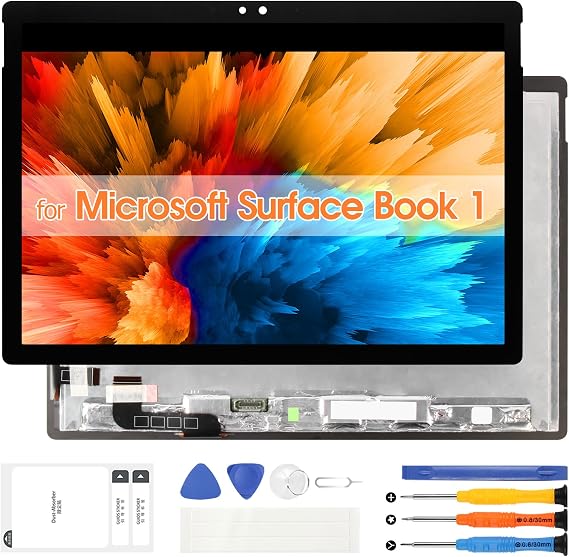
Screen Replacement for Microsoft Surface Book 1 LCD Screen for Surface Book 2 Display 1703 1704 1705 1706 1803 1804 1805 1806 Touch Screen Digitizer
Item #:
88850114
KYD 141
Price Details
Excluding Shipping & Custom charges ( Shipping and custom charges will be calculated on checkout )
*All items will import from US
0 ratings
Write a review
In stock
 Imported from USA store
QTY:
Order now and get it around Sunday, June 28
Secured transaction
Ubuy works hard to protect your security and privacy. Our advanced payment security system ensures confidentiality by encrypting your information during transmission using AES (Advanced Encryption Standards) and SSL (Secure Socket Layer) protocols. Your payment details are 100% secure as we do not share your payment details with third party sellers.
Our Top Logistics Partners


Our screen replacement for Microsoft Surface Book 1 have passed rigorous quality control checks and we will pack them well before shipment.

Fast
Shipping

Free
Return*

Secure Packaging

100% Original Products

PCI DSS Compliance

ISO 27001 Certified


What Stands Out
Perfect Compatibility
Designed specifically for Microsoft Surface Book 1 and 2 models, ensuring a seamless fit and optimal performance for various display types.
Complete Assembly Kit
Includes all necessary tools for installation, making the replacement process easy and convenient for users without extensive technical skills.
High Resolution Touch
Offers a vibrant, high-resolution touch display, enhancing the visual experience while providing responsive touch capabilities for everyday use.
Product Details
| Item Weight | 1.5 lbs (680 grams) |
Who Should Buy?

-
DIY Enthusiasts
Those who enjoy fixing their devices themselves will find this screen replacement ideal for hands-on repairs.
-
Budget-Conscious Users
Users looking to save money on repairs can benefit from this cost-effective solution to damaged screens.
-
Surface Book Owners
Owners of Surface Book 1 and 2 models needing a screen replacement can restore functionality effectively with this product.

-
Non-technical Users
Individuals without technical skills may struggle with installation, risking further damage to their device.
-
Warranty Holders
Users whose devices are still under warranty could void it by attempting self-repair with third-party parts.
-
Immediate Repairs
Those needing quick repairs might find this product unsuitable due to potential delays in shipping and installation time.
Product Description
Screen Replacement for Microsoft Surface Book 1 LCD Screen for Surface Book 2 Display 1703 1704 1705 1706 1803 1804 1805 1806 Touch Screen Digitizer Assembly with Tools(Black,13.5 inch)
Have any Query? Chat with us
Customer Questions & Answers
-
Question:
What models are compatible with this screen replacement?
Answer: This screen replacement is compatible with Microsoft Surface Book 1 as well as Surface Book 2 models including 1703, 1704, 1705, 1706, 1803, 1804, 1805, and 1806. It is important to choose the correct model for optimal functionality. Using the specified model numbers ensures that you receive a replacement that perfectly matches your device's specifications, allowing for seamless integration without performance issues. -
Question:
How do I know if I need a screen replacement?
Answer: Signs that you may need a screen replacement include physical damage such as cracks or shattered glass, unresponsive touch functionality, or display issues like dead pixels or discoloration. These problems can significantly impact your user experience, especially if you rely on your device for work or entertainment. Addressing these issues with a quality screen replacement can restore your device to its original performance. -
Question:
Can I install the screen replacement myself?
Answer: Yes, installing the screen replacement can be done independently if you have basic technical skills and the right tools. There are various online tutorials and videos that guide users through the installation process step by step. However, if you're not confident in your abilities, seeking assistance from a professional repair service ensures that your device is handled carefully and functions properly post-installation. -
Question:
What tools are needed for installation?
Answer: You will need a few basic tools for installation, including a suction cup, a heat gun or hair dryer, a set of precision screwdrivers, and possibly a spudger for prying apart the device. These tools help in carefully detaching the old screen and securing the new one in place. Using the right tools is essential for preventing further damage and ensuring a successful replacement. -
Question:
Is the Touch Screen Digitizer included with the replacement?
Answer: Yes, this screen replacement includes the Touch Screen Digitizer, which is essential for touchscreen functionality. Without this component, your device may not register touch commands effectively. This inclusion ensures that once you complete the installation, you have a fully functioning touchscreen, restoring the interactive capabilities of your Surface Book. -
Question:
What should I do if my screen flickers after replacement?
Answer: If your screen flickers after replacement, it may indicate an improper connection or a faulty component. First, check the connections to ensure everything is secured correctly. If everything appears to be in order, it could be a sign of a defective replacement part. In such cases, you may need to consult a professional for further diagnosis or consider obtaining a different part. -
Question:
Will a new screen improve my device's performance?
Answer: Yes, a new screen can enhance your device's overall performance, especially if the existing display was damaged or malfunctioning. A clear, operational screen improves visibility and touch responsiveness, thus enhancing your productivity and user experience during tasks like graphic design, gaming, or everyday browsing. -
Question:
Where can I buy this screen replacement?
Answer: You can purchase the Screen Replacement for Microsoft Surface Book LCD at Ubuy in Cayman Islands. Ubuy offers a range of products for your repair needs, ensuring you receive quality parts compatible with your device. Shopping at Ubuy provides an accessible platform where you can find various electronic products, making it convenient to locate the specific replacement necessary for your Surface Book. -
Question:
Are there any risks involved in replacing my screen?
Answer: Yes, there are some risks involved in replacing your screen, mainly if you are not experienced. Potential issues include damaging internal components or creating a seal that is not tight, leading to dust or moisture entry. If you are unsure about your skills, seeking help from professionals can mitigate these risks, ensuring that your device remains safe during the process. -
Question:
What type of display technology is used in this replacement?
Answer: The replacement screen utilizes LCD technology with a Touch Screen Digitizer, providing vibrant colors and responsive touch capabilities. This type of display is common in devices like the Surface Book, known for its clarity and reliability. This technology delivers an excellent user experience, especially for visually demanding tasks such as design work or multimedia consumption.
ARSSLY Screens Editorial Review
No editorial reviews found
Customer Reviews & Ratings
1 customers ratings
-
5 Star
0%
-
4 Star
100%
-
3 Star
0%
-
2 Star
0%
-
1 Star
0%
Review this product
Share your thoughts with other customers
Pros
- High-quality display
- Easy installation process
- Responsive touch screen
- Compatible with multiple models
- Clear and vibrant colors
Cons
- Minor adjustment needed for perfect fit
Product Price History
Important information
- Limitations : For products shipped internationally, please note that any manufacturer warranty may not be valid; manufacturer service options may not be available; product manuals, instructions, and safety warnings may not be in destination country languages; the products (and accompanying materials) may not be designed in accordance with destination country standards, specifications, and labeling requirements; and the products may not conform to destination country voltage and other electrical standards (requiring use of an adapter or converter if appropriate). The recipient is responsible for assuring that the product can be lawfully imported to the destination country. When ordering from Ubuy or its affiliates, the recipient is the importer of record and must comply with all laws and regulations of the destination country.
- Not all the products listed on Ubuy are for sale, as Ubuy is a global search engine. Products are subject to export/trade regulations.
KYD 141
Order now and get it around Sunday, June 28
This item is not restrict in my country.(Please click on above link if this item is not restrict in your country, So our team will review and allow.)
QTY:
Secured transaction
Ubuy works hard to protect your security and privacy. Our advanced payment security system ensures confidentiality by encrypting your information during transmission using AES (Advanced Encryption Standards) and SSL (Secure Socket Layer) protocols. Your payment details are 100% secure as we do not share your payment details with third party sellers.
Our Top Logistics Partners
Fastest cross-border delivery
Features & Benefits
- Compatible with Microsoft Surface Book 1 and 2 models.
- Includes comprehensive installation instructions and recommended video resources.
- High-quality LCD with anti-fingerprint technology for smooth touch.
- Thorough quality control for guaranteed performance.
- Package includes essential tools for installation.
- 13.5 inch display with full perspective for an enhanced viewing experience.