- Home Page /
- Electronics /
- Computer Accessories /
- Computer Components /
- Computer Internal Components /
- I/O Port Cards /
- USB Port Cards /
- Inateck PCIe to USB 3.2 Gen 2 Card with 20 Gb...
0 ratings

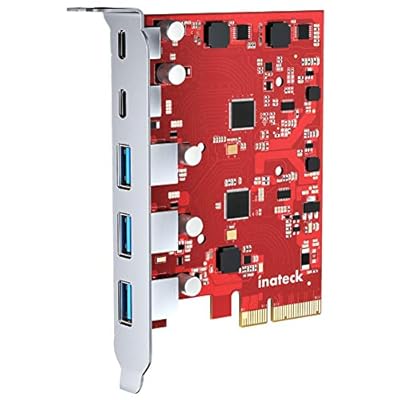
Inateck PCIe to USB 3.2 Gen 2 Card offers 20 Gbps bandwidth with 3 USB Type-A and 2 USB Type-C ports, ensuring fast-speed transfer and wide compatibility. Hassle-free installation guaranteed as it takes power directly from the PCIe slot on the motherboard, while ensuring safety with over-current protection.
Item #:
29261755
Inateck PCIe to USB 3.2 Gen 2 Card with 20 Gbps Bandwidth, 3 USB Type-A and 2 USB Type-C Ports, RedComets U21
Item #:
29261755
KYD 489
Price Details
Excluding Shipping & Custom charges ( Shipping and custom charges will be calculated on checkout )
*All items will import from US
0 ratings
Write a review
Out of stock
 Imported from USA store
Secured transaction
Ubuy works hard to protect your security and privacy. Our advanced payment security system ensures confidentiality by encrypting your information during transmission using AES (Advanced Encryption Standards) and SSL (Secure Socket Layer) protocols. Your payment details are 100% secure as we do not share your payment details with third party sellers.
Our Top Logistics Partners


Inateck PCIe to USB 3.2 Gen 2 Card offers 20 Gbps bandwidth with 3 USB Type-A and 2 USB Type-C ports, ensuring fast-speed transfer and wide compatibility. Hassle-free installation guaranteed as it takes power directly from the PCIe slot on the motherboard, while ensuring safety with over-current protection.

Fast
Shipping

Free
Return*

Secure Packaging

100% Original Products

PCI DSS Compliance

ISO 27001 Certified


What Stands Out
High-Speed Connectivity
Achieve lightning-fast data transfer speeds of up to 20 Gbps, ideal for professionals needing quick access to large files and seamless multitasking.
Multiple Ports
Features three USB Type-A and two USB Type-C ports, allowing you to connect multiple devices simultaneously, enhancing your productivity and convenience.
Easy Installation
Designed for straightforward installation in PCIe slots, making it accessible for users with varying tech skills, ensuring you can upgrade your system without hassle.
Product Details
| Package Weight | 1 Pound |
Who Should Buy?

-
Gamers
Enthusiasts requiring high-speed data transfer for gaming peripherals will benefit from the 20 Gbps bandwidth.
-
Content Creators
Professionals using external drives for video/audio editing will find ample connections and speed suitable for their needs.
-
Tech Savvy Users
Users looking to expand connectivity options for multiple devices will appreciate the combination of USB Type-A and Type-C.

-
Basic Users
Casual users with minimal connectivity needs may not require the extensive features of this high-performance card.
-
Older Systems
Users with outdated PCs lacking PCIe slots won't be able to install this expansion card effectively.
-
Budget Consumers
Individuals on a budget may find this product's price steep compared to simpler USB hub alternatives.
Product Description
Inateck PCIe to USB 3.2 Gen 2 Card with 20 Gbps Bandwidth, 3 USB Type-A and 2 USB Type-C Ports, RedComets U21
Have any Query? Chat with us
Customer Questions & Answers
-
Question:
What is the data transfer rate of the Inateck PCIe to USB 3.2 Gen 2 Card?
Answer: The Inateck PCIe to USB 3.2 Gen 2 Card offers a remarkable data transfer rate of up to 20 Gbps. This high bandwidth allows for rapid file transfers, making it an ideal choice for professionals who frequently work with large files such as videos, images, or software applications. With this card, users can seamlessly transfer data between devices without encountering lag, which is particularly beneficial for those who utilize high-speed external drives or multiple USB peripherals. -
Question:
How many USB ports does the Inateck PCIe to USB 3.2 Gen 2 Card have?
Answer: This card features a total of five USB ports: three USB Type-A and two USB Type-C ports. This versatile arrangement allows users to connect a variety of devices, from traditional USB peripherals like keyboards and mice to the latest USB-C devices such as smartphones and external SSDs. The combination of both port types ensures compatibility with most devices, providing greater flexibility in a workstation setup or a home entertainment system. -
Question:
Is the Inateck PCIe to USB 3.2 Gen 2 Card compatible with all motherboards?
Answer: The Inateck PCIe to USB 3.2 Gen 2 Card is designed to be compatible with a wide range of motherboards that have an available PCIe slot. It typically supports both Windows and Linux operating systems, facilitating easy integration into various setups. This makes it a suitable option for upgrading older systems or enhancing the functionality of newer ones, particularly for users who require additional USB connections or enhanced transfer speeds. -
Question:
Can I use multiple devices simultaneously with the Inateck PCIe to USB 3.2 Gen 2 Card?
Answer: Yes, the Inateck PCIe to USB 3.2 Gen 2 Card allows you to connect and use multiple devices simultaneously. With three Type-A and two Type-C ports available, users can seamlessly plug in several peripherals such as printers, external hard drives, and other USB devices without sacrificing performance. For example, a gamer could connect a mouse, keyboard, and headset all at once while streaming their gameplay efficiently. -
Question:
Does the Inateck PCIe to USB 3.2 Gen 2 Card require external power?
Answer: No, the Inateck PCIe to USB 3.2 Gen 2 Card does not require a supplemental power source to function. It draws power directly from the PCIe slot on the motherboard, which simplifies installation and minimizes cable clutter. This feature is particularly advantageous for users who want to keep their workspace tidy or for those using laptops that may have limited power output capabilities. -
Question:
What systems support the Inateck PCIe to USB 3.2 Gen 2 Card?
Answer: The Inateck PCIe to USB 3.2 Gen 2 Card is compatible with most PC systems that feature an available PCIe x1 or x4 slot. It supports various operating systems, including Windows (7 and higher) and Linux. This broad compatibility makes it suitable for diverse environments, including gaming setups, workstations, or home computers that require enhanced USB connectivity and faster data transfer capabilities. -
Question:
What is the difference between USB Type-A and Type-C ports on this card?
Answer: USB Type-A ports are the traditional rectangular ports widely used for connecting devices like mice, keyboards, and some storage devices. In contrast, USB Type-C ports offer a reversible design and can provide higher power output and data speeds. The Inateck PCIe to USB 3.2 Gen 2 Card’s combination of both port types caters to a broad range of devices, allowing users to leverage the latest technology while still using their older peripherals. -
Question:
What materials are used in the construction of the Inateck PCIe to USB 3.2 Gen 2 Card?
Answer: The Inateck PCIe to USB 3.2 Gen 2 Card is built using high-quality components, including a robust circuit board and reinforced connectors. This construction enhances durability and reliability during operation. Advanced materials ensure that the card maintains optimal performance, whether handling extensive data transfer tasks or providing stable connectivity for multiple devices under demanding situations, making it suitable for both everyday and professional use. -
Question:
How do I install the Inateck PCIe to USB 3.2 Gen 2 Card?
Answer: To install the Inateck PCIe to USB 3.2 Gen 2 Card, simply power off your computer and open the case to access the motherboard. Locate an available PCIe slot, insert the card firmly, and secure it in place. After that, close the case and power on your computer. The card should be automatically detected by your operating system, prompting installation of necessary drivers if required. This straightforward installation process makes it accessible even for users with limited technical experience. -
Question:
Where can I buy the Inateck PCIe to USB 3.2 Gen 2 Card?
Answer: You can purchase the Inateck PCIe to USB 3.2 Gen 2 Card from Ubuy in Cayman Islands. Ubuy provides a convenient online shopping experience with access to a wide range of electronics, including this USB card. Shopping through Ubuy ensures you find the product along with useful customer reviews and comprehensive product details, allowing you to make informed decisions.
Inateck USB Port Cards Editorial Review
The Inateck PCIe to USB 3.2 Gen 2 Card is a great addition for those looking to add more USB ports to their computer. It has 3 USB Type-A and 2 USB Type-C ports with a high bandwidth of 20 Gbps. The card is compatible with Mac OS big sur and is easy to install. Some users have reported issues with compatibility with certain devices, so it is recommended to check with customer support if there are any specific requirements. Overall, this PCIe card offers a convenient way to expand USB capabilities on your computer.
Customer Reviews & Ratings
1 customers ratings
-
5 Star
100%
-
4 Star
0%
-
3 Star
0%
-
2 Star
0%
-
1 Star
0%
Review this product
Share your thoughts with other customers
Pros
- Adds more USB ports to computer
- High bandwidth of 20 Gbps
- Compatible with Mac OS big sur
- Easy to install
Cons
- Potential compatibility issues with certain devices
Product Price History
Important information
- Limitations : For products shipped internationally, please note that any manufacturer warranty may not be valid; manufacturer service options may not be available; product manuals, instructions, and safety warnings may not be in destination country languages; the products (and accompanying materials) may not be designed in accordance with destination country standards, specifications, and labeling requirements; and the products may not conform to destination country voltage and other electrical standards (requiring use of an adapter or converter if appropriate). The recipient is responsible for assuring that the product can be lawfully imported to the destination country. When ordering from Ubuy or its affiliates, the recipient is the importer of record and must comply with all laws and regulations of the destination country.
- Not all the products listed on Ubuy are for sale, as Ubuy is a global search engine. Products are subject to export/trade regulations.
KYD 489
Currently unavailable.
We don't know when or if this item will be back in stock.
This item is not restrict in my country.(Please click on above link if this item is not restrict in your country, So our team will review and allow.)
Secured transaction
Ubuy works hard to protect your security and privacy. Our advanced payment security system ensures confidentiality by encrypting your information during transmission using AES (Advanced Encryption Standards) and SSL (Secure Socket Layer) protocols. Your payment details are 100% secure as we do not share your payment details with third party sellers.
Our Top Logistics Partners
Fastest cross-border delivery
Features & Benefits
- 20 Gbps bandwidth with 3 USB Type-A and 2 USB Type-C ports
- Fast-speed transfer with USB Type-A port taking exclusive 10 Gbps bandwidth
- Wide compatibility with Windows 11, 7, 8, 10, and Mac OS 10.8.2 and above
- Simple installation that takes power directly from the PCIe slot on the motherboard
- Safety guaranteed with over-current protection
- No external power adapter required