- Home Page /
- Electronics /
- Television & Video /
- Television Accessories /
- Remote Controls /
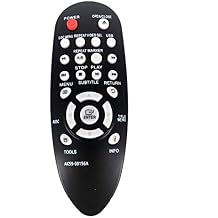
- New SAM63 AK59-00156A Remote Control for Sams...
0 ratings

Item #:
43395740
New SAM63 AK59-00156A Remote Control for Samsung for DVD-E360/XU Entry DVD Player
Item #:
43395740
KYD 18
Price Details
Excluding Shipping & Custom charges ( Shipping and custom charges will be calculated on checkout )
*All items will import from US
0 ratings
Write a review
In stock
 Imported from USA store
QTY:
Order now and get it around Tuesday, July 07
Secured transaction
Ubuy works hard to protect your security and privacy. Our advanced payment security system ensures confidentiality by encrypting your information during transmission using AES (Advanced Encryption Standards) and SSL (Secure Socket Layer) protocols. Your payment details are 100% secure as we do not share your payment details with third party sellers.
Our Top Logistics Partners


Get the new SAM63 AK59-00156A Remote Control for Samsung DVD-E360/XU Entry DVD Player today!

Fast
Shipping

Free
Return*

Secure Packaging

100% Original Products

PCI DSS Compliance

ISO 27001 Certified


What Stands Out
Universal Compatibility
This remote is designed to work seamlessly with Samsung DVD-E360/XU, ensuring easy control over your DVD player without complications or the need for additional setups.
User-Friendly Design
Featuring an intuitive layout and responsive buttons, the SAM63 remote enhances your viewing experience by providing quick access to essential functions, making it perfect for all age groups.
Durable Construction
Built with high-quality materials, this remote is designed for longevity, ensuring reliable performance over time and providing outstanding value compared to standard remotes that may wear out quickly.
Product Details
- Compatible with Samsung DVD-E360/XU entry DVD player
- Replacement remote control for DVD player
- Package contains 1 remote only (batteries and instructions not included)
- Can replace old or broken remote controls for DVD-E360/XU
- Not a universal remote, check compatibility with original remote before purchase
- Compatible with most functions of the original remote
| Item Weight | 0.2 lbs (90 grams) |
Who Should Buy?

-
DVD Player Owners
Ideal for users with Samsung DVD-E360/XU players needing a reliable, easy-to-use remote control replacement.
-
Budget-Conscious Consumers
A cost-effective replacement option for those looking to maintain their DVD player without spending on original remotes.
-
Seniors and Kids
Designed to be user-friendly, making it perfect for seniors and children who may struggle with complex remotes.

-
Tech-Savvy Users
Advanced users may find limited functionalities frustrating compared to more complex remote options available.
-
Non-Samsung Devices
Not suitable for users with DVD players from other brands seeking compatibility with their specific device models.
-
High-End Systems
Users with sophisticated, high-end home theater systems may require features not available in this basic remote control.
Product Description
New SAM63 AK59-00156A Remote Control for Samsung for DVD-E360/XU Entry DVD Player
About This Item
Introducing the New SAM63 AK59-00156A Remote Control for Samsung DVD-E360XU Entry DVD Player! Upgrade your movie-watching experience with the Samsung AK59-00156A Remote Control. Designed specifically for the Samsung DVD-E360XU Entry DVD Player, this remote control is your ticket to effortless control over your entertainment. Featuring a sleek and ergonomic design, this remote control not only looks stylish but also feels comfortable in your hand. With its user-friendly layout and buttons that are easy to press, navigating through your DVD player's features has never been easier. The New SAM63 Remote Control is the perfect replacement for your old, worn-out remote control.
Say goodbye to constantly pressing buttons multiple times just to get a response. With this new remote control, you can enjoy quick and accurate responses, allowing you to seamlessly navigate through menus, adjust settings, and control playback functions with ease. Equipped with all the essential buttons you need, including playback controls, navigation buttons, and dedicated buttons for accessing various functions, this remote control puts the power at your fingertips. Whether you're pausing, skipping scenes, or adjusting the volume, you can do it all without leaving your seat. Not only does this remote control offer convenience, but it also boasts excellent compatibility.
It is specifically designed for the Samsung DVD-E360XU Entry DVD Player, ensuring a seamless and hassle-free connection. Simply point the remote control at your DVD player, press the desired button, and let the magic happen. Upgrade your movie nights with the New SAM63 AK59-00156A Remote Control for Samsung DVD-E360XU Entry DVD Player. Order yours today and take full control of your entertainment experience!.
Have any Query? Chat with us
Customer Questions & Answers
-
Question:
What devices are compatible with the SAM63 AK59-00156A Remote Control?
Answer: The SAM63 AK59-00156A Remote Control is specifically designed for the Samsung DVD-E360XU entry DVD player. It offers compatibility with this model, ensuring full functionality, including menu navigation and playback controls. Users with this DVD player can effectively manage their media experience using this remote. If you have other Samsung devices, check their compatibility, as this remote may not work with all models, focusing primarily on enhancing the user experience for the DVD-E360XU. -
Question:
How do I set up the SAM63 AK59-00156A Remote Control?
Answer: Setting up the SAM63 AK59-00156A Remote Control is straightforward. Upon receiving the remote, simply insert the appropriate batteries as indicated in the battery compartment. Once the batteries are installed, point the remote at your Samsung DVD-E360XU and ensure there are no obstructions. This remote is designed for immediate use, allowing you to start controlling your DVD player without any complex pairing processes. Just turn on your DVD player, and the remote should work seamlessly. -
Question:
Does the SAM63 AK59-00156A Remote Control require programming?
Answer: No, the SAM63 AK59-00156A Remote Control does not require programming. It is a plug-and-play solution specifically for the Samsung DVD-E360XU. This means that once you have inserted batteries, it should start functioning right out of the box. This feature is particularly convenient for users who wish to skip complex setup processes and get straight to enjoying their favorite movies without hindrance. -
Question:
Can the SAM63 AK59-00156A Remote Control work with other brands?
Answer: The SAM63 AK59-00156A Remote Control is primarily designed for the Samsung DVD-E360XU and may not function with other brands or models. While some generic remotes may offer multi-device capabilities, this specific remote does not support devices outside of its designated model. To ensure proper functionality, it’s best to use this remote exclusively with compatible Samsung devices. -
Question:
What features are included with the SAM63 AK59-00156A Remote Control?
Answer: The SAM63 AK59-00156A Remote Control includes essential features like play, pause, rewind, fast forward, and volume control, tailored for the Samsung DVD-E360XU. It also incorporates easy navigation for menus and setup, allowing you to fluidly interact with your DVD player. These features significantly enhance your viewing experience, giving you effortless control at your fingertips while watching your favorite films. -
Question:
Is the SAM63 AK59-00156A Remote Control durable?
Answer: Yes, the SAM63 AK59-00156A Remote Control is designed with durability in mind. Made from quality materials, it can withstand regular use and the occasional drops common in home environments. Its ergonomic design also ensures it fits comfortably in your hand, allowing you to handle it easily during movie nights or video sessions. Its longevity and robustness make it a reliable tool for enhancing your entertainment experience. -
Question:
What should I do if the remote stops working?
Answer: If the SAM63 AK59-00156A Remote Control stops working, first check the batteries to ensure they are fresh and installed correctly. Replace them if necessary, as depleted batteries can cause the remote to malfunction. If the issue persists, inspect for any obstructions between the remote and the DVD player that might impede the signal. Lastly, consider checking the DVD player itself for potential issues. Typically, retaining a clear line of sight and ensuring functional batteries resolves most common problems. -
Question:
Can I use the SAM63 AK59-00156A Remote Control for other DVD players?
Answer: The SAM63 AK59-00156A Remote Control is specifically designed for the Samsung DVD-E360XU and may not work with other DVD players. Each DVD remote is uniquely coded to its respective device model, ensuring tailored commands and responses. For optimal performance and functionality, it’s advisable to use this remote only with the compatible Samsung player to avoid any operational difficulties. -
Question:
Where can I buy the New SAM63 AK59-00156A Remote Control for Samsung DVD-E360XU in Cayman Islands?
Answer: You can purchase the New SAM63 AK59-00156A Remote Control for Samsung DVD-E360XU from Ubuy in Cayman Islands. Ubuy offers a user-friendly shopping experience, ensuring you can acquire the remote easily. They cater to diverse customer needs, providing reliable access to quality electronics and remote controls. For a seamless purchasing process, visit Ubuy to find availability and further details about the product. -
Question:
Is there a manual available for the SAM63 AK59-00156A Remote Control?
Answer: Yes, a manual is generally provided with the SAM63 AK59-00156A Remote Control, offering users valuable information on its features and functions. This manual typically includes instructions on battery installation, button functions, troubleshooting tips, and more. For those new to using remotes or looking for specific information, this resource can enhance comprehension and ensure you maximize your remote’s potential for controlling the DVD-E360XU seamlessly.
xingzhihua Remote Controls Editorial Review
No editorial reviews found
Customer Reviews & Ratings
1 customers ratings
-
5 Star
0%
-
4 Star
100%
-
3 Star
0%
-
2 Star
0%
-
1 Star
0%
Review this product
Share your thoughts with other customers
Product Price History
Important information
- Limitations : For products shipped internationally, please note that any manufacturer warranty may not be valid; manufacturer service options may not be available; product manuals, instructions, and safety warnings may not be in destination country languages; the products (and accompanying materials) may not be designed in accordance with destination country standards, specifications, and labeling requirements; and the products may not conform to destination country voltage and other electrical standards (requiring use of an adapter or converter if appropriate). The recipient is responsible for assuring that the product can be lawfully imported to the destination country. When ordering from Ubuy or its affiliates, the recipient is the importer of record and must comply with all laws and regulations of the destination country.
- Not all the products listed on Ubuy are for sale, as Ubuy is a global search engine. Products are subject to export/trade regulations.
KYD 18
Order now and get it around Tuesday, July 07
This item is not restrict in my country.(Please click on above link if this item is not restrict in your country, So our team will review and allow.)
QTY:
Secured transaction
Ubuy works hard to protect your security and privacy. Our advanced payment security system ensures confidentiality by encrypting your information during transmission using AES (Advanced Encryption Standards) and SSL (Secure Socket Layer) protocols. Your payment details are 100% secure as we do not share your payment details with third party sellers.
Our Top Logistics Partners
Fastest cross-border delivery
Features & Benefits
- High-quality replacement remote control
- Easy to use and compatible with DVD-E360/XU
- Batteries and instructions not included
- Standard shipping takes almost 7-25 days to arrive
- Ensure that the buttons and model match those of your original remote before purchasing
- Contact customer support if not received within 25 days.