0 ratings

Item #:
59872630
LIONWEI USB 3.0 to Dual HDMI Docking Station for Windows & macOS, USB C Adapter 2 Monitor Splitter for MacBook ProAirM1M2DellHPLenovoSurface
Item #:
59872630
KYD 84
Price Details
Excluding Shipping & Custom charges ( Shipping and custom charges will be calculated on checkout )
*All items will import from US
0 ratings
Write a review
In stock
 Imported from USA store
QTY:
Order now and get it around Wednesday, July 01
Secured transaction
Ubuy works hard to protect your security and privacy. Our advanced payment security system ensures confidentiality by encrypting your information during transmission using AES (Advanced Encryption Standards) and SSL (Secure Socket Layer) protocols. Your payment details are 100% secure as we do not share your payment details with third party sellers.
Our Top Logistics Partners


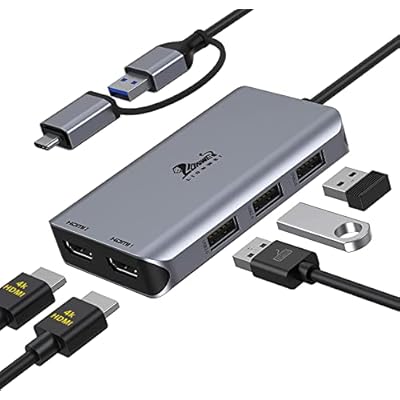
Turn a single USB-C/USB 3.0 port into 2 HDMI(1*HDMI 4K@30Hz and 1*1080P@60Hz) port and 3 USB 2.0 ports.

Fast
Shipping

Free
Return*

Secure Packaging

100% Original Products

PCI DSS Compliance

ISO 27001 Certified


What Stands Out
Dual HDMI Support
Easily connect two HDMI monitors simultaneously, allowing for enhanced productivity and multitasking on both Windows and macOS systems.
Versatile Compatibility
Designed for a wide range of devices including MacBook Pro, Dell, HP, and Lenovo, ensuring seamless integration across various brands and models.
USB C/USB 3.0
Supports both USB C and USB 3.0 connections, providing flexible connectivity options while ensuring fast data transfer speeds for efficient performance.
Product Details
| Item Weight | 1.5 lbs (680 grams) |
Who Should Buy?

-
Creative Professionals
Ideal for graphic designers and video editors needing multiple high-resolution displays for enhanced productivity.
-
Office Workers
Beneficial for workers who multitask with various applications across multiple screens for better workflow.
-
Gamers
Great for users who enjoy gaming on multiple monitors, providing immersive experiences with dual-display support.

-
Budget Users
Not suitable for those seeking a low-cost solution, as high-quality docking stations can be expensive.
-
Single Monitor Users
Not ideal for individuals who only need a single display, as it provides dual-monitor capabilities.
-
Older Devices
Not recommended for users with outdated laptops that lack USB C or USB 3.0 ports.
Product Description
LIONWEI USB 3.0 to Dual HDMI Docking Station for Windows & macOS, USB C Adapter 2 Monitor Splitter for MacBook ProAirM1M2DellHPLenovoSurface
Have any Query? Chat with us
Customer Questions & Answers
-
Question:
What devices are compatible with the LIONWEI USB 3.0 to Dual HDMI Docking Station?
Answer: The LIONWEI USB 3.0 to Dual HDMI Docking Station is compatible with a wide range of devices including MacBook Pro, MacBook Air (M1, M2), Dell, HP, Lenovo laptops, and Microsoft Surface. This versatility makes it perfect for both Windows and macOS users, allowing them to seamlessly connect dual monitors for enhanced productivity. Whether you're a professional multitasking between applications or a gamer wanting to expand your visual experience, this docking station meets diverse needs. -
Question:
How do I set up the LIONWEI Dual HDMI Docking Station?
Answer: Setting up the LIONWEI Dual HDMI Docking Station is straightforward. Simply connect the USB 3.0 cable to your laptop and then attach your monitors via HDMI cables to the docking station. Once you power on your monitors, your system will recognize the additional displays automatically. This plug-and-play functionality simplifies your workspace setup, allowing you to optimize your screen space for tasks such as video editing, programming, or presentations instantly. -
Question:
Can I use the LIONWEI Docking Station with multiple monitors?
Answer: Yes, the LIONWEI USB 3.0 to Dual HDMI Docking Station allows you to connect two HDMI monitors simultaneously. This feature is particularly beneficial for users who need extended desktop configurations for tasks like financial analysis or creative design work. With dual-monitor support, you can keep multiple documents open side by side or manage numerous applications effectively, enhancing your workflow and productivity. -
Question:
What resolutions does the LIONWEI docking station support?
Answer: The LIONWEI USB 3.0 to Dual HDMI Docking Station supports high-definition resolutions up to 4K at 30Hz when displaying a single monitor, and 1080p at 60Hz for dual monitor setups. This capability ensures that whether you are watching movies, gaming, or working with high-resolution images, you experience crisp and clear visuals. The high-quality output is crucial for users in design fields or those who enjoy high-resolution multimedia. -
Question:
Is the LIONWEI Docking Station powered?
Answer: The LIONWEI USB 3.0 to Dual HDMI Docking Station is powered through the USB connection from your laptop, eliminating the need for an extra power adapter. This design enhances portability, making it an ideal companion for those on the go or working in hot desking environments. You can connect it to your laptop at your office, home, or while traveling without hassle, ensuring efficient workspace setup wherever you are. -
Question:
Does the docking station require any additional software or drivers?
Answer: No, the LIONWEI USB 3.0 to Dual HDMI Docking Station operates on a plug-and-play basis without the need for additional software or drivers. This feature simplifies the setup process and allows users to extend their displays without complication. Whether you are an IT professional or someone who occasionally uses multiple screens, the hassle-free setup makes it accessible for everyone, enhancing user experience significantly. -
Question:
Can I use this docking station with a gaming console?
Answer: The LIONWEI USB 3.0 to Dual HDMI Docking Station is not designed for use with gaming consoles. It primarily connects laptops and is optimized for dual-monitor setups in a professional environment. If you are looking to expand your gaming setup, consider utilizing dedicated HDMI splitters or devices specifically engineered for gaming consoles to achieve compatibility while maintaining high performance. -
Question:
What is the difference between USB 3.0 and USB-C in this context?
Answer: USB 3.0 connections in the LIONWEI docking station facilitate fast data transfer rates and efficient connection to various devices. USB-C, on the other hand, offers increased versatility and faster charging capabilities. For users with newer MacBook models, the included USB-C adapter allows seamless connection to the docking station, accommodating both types of connections while maximizing performance in varied setups. -
Question:
How do I troubleshoot display issues with the docking station?
Answer: If you encounter display issues with the LIONWEI USB 3.0 to Dual HDMI Docking Station, begin by checking all connections to ensure they are secure. Make sure your monitors are set to the correct input sources. Additionally, updating your graphics drivers on your laptop can resolve conflicts. In case the issue persists, disconnect and reconnect the station to refresh the connection or try restarting your laptop for a complete reset of the displays. -
Question:
Where can I buy LIONWEI USB 3.0 to Dual HDMI Docking Station?
Answer: You can buy the LIONWEI USB 3.0 to Dual HDMI Docking Station at Ubuy in Cayman Islands. Ubuy offers a reliable platform for purchasing electronics and accessories, providing detailed product information and customer support. It's a convenient choice for customers looking to simplify their buying experience while securing high-quality tech products.
LIONWEI Docking Stations Editorial Review
The USB 3.0 to Dual HDMI Docking Station is a versatile adapter that allows users to connect additional displays and accessories to their laptops, desktops or Chromebooks. Most customers were satisfied with the product's performance, plug-and-play capabilities with easy driver installation, and compatibility with a variety of laptops and monitors. However, some reviewers encountered issues with overheating, inConsistent dual monitor functionality, and difficulty connecting USB devices. Additionally, the product's specifications on Amazon's product page were inaccurate, with only one HDMI port supporting 4K resolution. Overall, the USB 3.0 to Dual HDMI Docking Station is reasonably priced and useful for those who require multiple displays but cautious buyers should be aware of these issues.
Customer Reviews & Ratings
1 customers ratings
-
5 Star
0%
-
4 Star
100%
-
3 Star
0%
-
2 Star
0%
-
1 Star
0%
Review this product
Share your thoughts with other customers
Pros
- Plug-and-play with easy driver installation
- Versatile-Works well with a variety of laptops, desktops and Chromebooks
- Provides access to additional displays and USB devices
- Fast operating speed
Cons
- Overheating
Product Price History
Important information
- Limitations : For products shipped internationally, please note that any manufacturer warranty may not be valid; manufacturer service options may not be available; product manuals, instructions, and safety warnings may not be in destination country languages; the products (and accompanying materials) may not be designed in accordance with destination country standards, specifications, and labeling requirements; and the products may not conform to destination country voltage and other electrical standards (requiring use of an adapter or converter if appropriate). The recipient is responsible for assuring that the product can be lawfully imported to the destination country. When ordering from Ubuy or its affiliates, the recipient is the importer of record and must comply with all laws and regulations of the destination country.
- Not all the products listed on Ubuy are for sale, as Ubuy is a global search engine. Products are subject to export/trade regulations.
KYD 84
Order now and get it around Wednesday, July 01
This item is not restrict in my country.(Please click on above link if this item is not restrict in your country, So our team will review and allow.)
QTY:
Secured transaction
Ubuy works hard to protect your security and privacy. Our advanced payment security system ensures confidentiality by encrypting your information during transmission using AES (Advanced Encryption Standards) and SSL (Secure Socket Layer) protocols. Your payment details are 100% secure as we do not share your payment details with third party sellers.
Our Top Logistics Partners
Fastest cross-border delivery
Features & Benefits
- Dual monitor adapter for MacBook Air/Pro M1 M1 pro M2, iMac/iMac Pro, PS4 Pro, surface Pro, Chromebook Pixel, Dell, ASUS, HP, Lenovo, and more Thunderbolt 3/4 or USB 3.0 laptops.
- Equipped with the newest generation super smart chip for long time use.
- Supports mirror or extend mode with crystal clear 3D visual and high quality video experience.
- Three USB 2.0 ports support data transfer at up to 480Mbps.
- If the built-in driver is installed and it still does not work, please update the latest driver according to the driver link in instantview.
- Supports both SST & MST.