0 ratings

Item #:
13151128
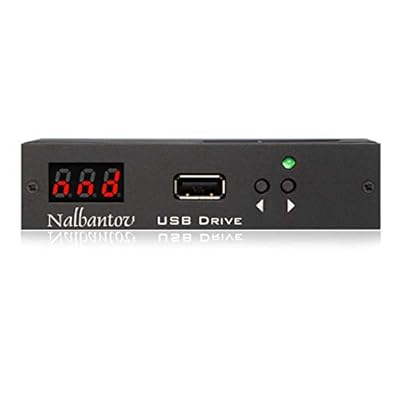
Floppy Disk USB Emulator Nalbantov N-Drive 1000 for Roland E500 XP60 XP80 EM2000 MT300S AT45
Item #:
13151128
KYD 322
Price Details
Excluding Shipping & Custom charges ( Shipping and custom charges will be calculated on checkout )
*All items will import from US
0 ratings
Write a review
In stock
 Imported from USA store
QTY:
Order now and get it around Friday, August 07
Secured transaction
Ubuy works hard to protect your security and privacy. Our advanced payment security system ensures confidentiality by encrypting your information during transmission using AES (Advanced Encryption Standards) and SSL (Secure Socket Layer) protocols. Your payment details are 100% secure as we do not share your payment details with third party sellers.
Our Top Logistics Partners


You can store up to 1000 floppy disks on a single USB flash drive!

Fast
Shipping

Free
Return*

Secure Packaging

100% Original Products

PCI DSS Compliance

ISO 27001 Certified


What Stands Out
Seamless Compatibility
Designed for Roland E500, XP60, XP80, EM2000, MT300(S), and AT45, this emulator provides a hassle-free, plug-and-play alternative to traditional floppy disks, enhancing your music production workflow.
High Storage Capacity
With a robust 1000MB storage capacity, the N-Drive offers ample space for your samples and projects, eliminating the limitations associated with old floppy disks and ensuring smooth, uninterrupted creativity.
Durable Design
Built with high-quality components, this USB emulator not only promises longevity but also protects your data from wear and tear, positioning it as a reliable investment for musicians and sound designers.
Product Details
| Item Weight | 0.5 lbs (230 grams) |
Who Should Buy?

-
Musicians
Ideal for musicians using Roland keyboards, needing modern storage solutions without the hassle of floppy disks.
-
Studio Owners
Perfect for studio owners looking to preserve and access classic sounds without relying on outdated technology.
-
Vintage Gear Enthusiasts
Great for enthusiasts wanting to modernize vintage Roland equipment while maintaining original functionality and access.

-
Casual Users
Not suitable for casual users who do not require extensive storage or specific compatibility with Roland products.
-
Non-Technical Individuals
May be challenging for users uncomfortable with technology and installation processes requiring technical understanding.
-
Non-Roland Equipment
Not recommended for users with non-Roland musical instruments as compatibility is limited to specific Roland models.
Product Description
Floppy Disk USB Emulator Nalbantov N-Drive 1000 for Roland E500 XP60 XP80 EM2000 MT300S AT45
Have any Query? Chat with us
Customer Questions & Answers
-
Question:
What is the Floppy Disk USB Emulator Nalbantov N-Drive 1000 compatible with?
Answer: The Nalbantov N-Drive 1000 is specifically designed to be compatible with several Roland synthesizers and workstations, including models such as E500, XP60, XP80, EM2000, MT300S, and AT45. This compatibility allows musicians to easily transition from traditional floppy disks to USB storage, streamlining their workflow. For instance, users of older Roland keyboards can access modern files and sounds without the need to find old floppy disks, making it a valuable upgrade for any performer or producer. -
Question:
How does the Nalbantov N-Drive 1000 work?
Answer: The Nalbantov N-Drive 1000 functions as a direct replacement for the floppy drive in compatible Roland instruments. Once installed, it emulates the floppy drive's interface, enabling users to read USB flash drives just as they would with floppy disks. The convenience of using USB means you can store a plethora of samples, patches, and songs all in one compact device, enhancing your creative possibilities. It’s particularly useful for musicians looking to expand their library of sounds without the hassle of maintaining outdated storage formats. -
Question:
Can I use any USB flash drive with the N-Drive 1000?
Answer: Yes, you can use a variety of USB flash drives with the Nalbantov N-Drive 1000, but it’s recommended to format them to FAT16 for optimal compatibility. This ensures smooth operation and prevents errors while loading files. There are numerous flash drives available today that can be formatted at your convenience, allowing you to choose the capacity that suits your needs. For musicians who want to keep their productions organized, this means being able to easily load all your favorite sounds or even entire projects. -
Question:
Is the installation of the N-Drive 1000 complicated?
Answer: Installing the Nalbantov N-Drive 1000 is relatively straightforward and does not require professional assistance. It typically involves removing the existing floppy drive and connecting the emulator in its place. Most users with basic technical skills can accomplish this with standard tools. The user-friendly setup combined with the ability to modernize your equipment makes it a worthwhile consideration. Musicians can enjoy the plethora of advantages that contemporary technology brings without being bogged down by complicated installation processes. -
Question:
What file formats does the N-Drive 1000 support?
Answer: The N-Drive 1000 primarily supports standard Roland floppy disk file formats. This typically includes .sysex and .mid files, which are essential for loading samples and patches into compatible Roland instruments. This compatibility allows musicians to seamlessly integrate their existing library and make use of sounds they've created or downloaded. It's particularly beneficial during live performance setups where quick access to various sounds can make a significant impact on the overall experience. -
Question:
How do I format my USB drive for use with the N-Drive 1000?
Answer: To format your USB drive for use with the Nalbantov N-Drive 1000, you should utilize a computer to format the drive to FAT16, as this is the most compatible file system for the emulator. You can easily accomplish this by right-clicking on the drive in your operating system’s file explorer and selecting the format option, then choosing FAT16. This process ensures that your USB drive works efficiently with your Roland device, allowing you to set it up for immediate use during performances or rehearsals. -
Question:
Can the N-Drive 1000 enhance my performance capabilities?
Answer: Absolutely! The Nalbantov N-Drive 1000 enhances performance capabilities by allowing users to access a broader range of sounds and samples saved on USB drives. This flexibility means you can switch between various sounds or patches quickly, which is key during live settings where every second counts. Furthermore, it reduces the clutter of physical floppy disks, providing a more streamlined setup for artists. Musicians can now focus on their performance rather than worrying about disk management. -
Question:
Are there specific considerations for using the N-Drive 1000 with older models?
Answer: When using the Nalbantov N-Drive 1000 with older Roland models, it's essential to ensure that you have the correct software versions and that your device is compatible. While many users have successfully upgraded, checking forums or manufacturer recommendations can provide insight into any limitations or needed adjustments. Musicians often find that these updates facilitate a smoother transition and allow older equipment to remain relevant in modern setups, maximizing your investment in gear. -
Question:
What are the advantages of the Floppy Disk USB Emulator?
Answer: The primary advantages of the Floppy Disk USB Emulator Nalbantov N-Drive 1000 include increased storage capacity, faster access to files, and improved reliability compared to traditional floppy disks, which are prone to wear and tear. This upgrade not only enhances your workflow by making it easier to store and retrieve sounds but also preserves your classic equipment's functionality. Additionally, it allows users to incorporate modern techniques into their performances or recordings, positioning musicians to remain competitive in today's evolving music landscape. -
Question:
Where can I buy the Floppy Disk USB Emulator Nalbantov N-Drive 1000?
Answer: You can purchase the Floppy Disk USB Emulator Nalbantov N-Drive 1000 for Roland E500 XP60 XP80 EM2000 MT300S AT45 from Ubuy in Cayman Islands. Ubuy offers a wide range of electronic products and ensures a seamless online shopping experience tailored to meet your needs. By choosing Ubuy, you can easily access product information and reviews, making your decision-making process more informed. This adds convenience, allowing you to invest in the right technology to enhance your musical pursuits.
Nalbantov Synthesizer & Workstation Keyboards Editorial Review
No editorial reviews found
Customer Reviews & Ratings
1 customers ratings
-
5 Star
100%
-
4 Star
0%
-
3 Star
0%
-
2 Star
0%
-
1 Star
0%
Review this product
Share your thoughts with other customers
Pros
- Easy installation and setup
- Supports multiple Roland models
- High compatibility with existing software
- Durable and long-lasting design
- Excellent data transfer speed
Cons
- Initial cost can be high
Product Price History
Important information
- Limitations : For products shipped internationally, please note that any manufacturer warranty may not be valid; manufacturer service options may not be available; product manuals, instructions, and safety warnings may not be in destination country languages; the products (and accompanying materials) may not be designed in accordance with destination country standards, specifications, and labeling requirements; and the products may not conform to destination country voltage and other electrical standards (requiring use of an adapter or converter if appropriate). The recipient is responsible for assuring that the product can be lawfully imported to the destination country. When ordering from Ubuy or its affiliates, the recipient is the importer of record and must comply with all laws and regulations of the destination country.
- Not all the products listed on Ubuy are for sale, as Ubuy is a global search engine. Products are subject to export/trade regulations.
KYD 322
Order now and get it around Friday, August 07
This item is not restrict in my country.(Please click on above link if this item is not restrict in your country, So our team will review and allow.)
QTY:
Secured transaction
Ubuy works hard to protect your security and privacy. Our advanced payment security system ensures confidentiality by encrypting your information during transmission using AES (Advanced Encryption Standards) and SSL (Secure Socket Layer) protocols. Your payment details are 100% secure as we do not share your payment details with third party sellers.
Our Top Logistics Partners
Fastest cross-border delivery
Features & Benefits
- Increases storage capacity by 10 times compared to the N-Drive 100.
- Stores up to 1000 floppy disks in one USB drive.
- Compatible with both PCs and Macs.
- Manufactured by a trusted family company with years of experience.
- High quality electronics designed for perfect performance.
- Part of a wide range of over 600 USB floppy drive emulators.