0 ratings





Item #:
62800146
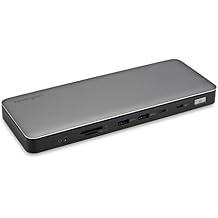
Plugable 16-in-1 Thunderbolt 4 Dock Dual 4K Monitors for M4/M5 MacBook Air/Pro, 100W Charging, 2X HDMI, 2X DisplayPort, 2.5G Ethernet, 7X USB,
87% of respondents would recommend this to a friend
Item #:
62800146
KYD 318
Price Details
Excluding Shipping & Custom charges ( Shipping and custom charges will be calculated on checkout )
*All items will import from US
In stock
 Imported from USA store
QTY:
Order now and get it around Friday, June 26
Secured transaction
Ubuy works hard to protect your security and privacy. Our advanced payment security system ensures confidentiality by encrypting your information during transmission using AES (Advanced Encryption Standards) and SSL (Secure Socket Layer) protocols. Your payment details are 100% secure as we do not share your payment details with third party sellers.
Our Top Logistics Partners


More Screens, More Power - Go big with up to 4x screens up to 4K 60Hz on Thunderbolt 4 Windows systems.

Fast
Shipping

Free
Return*

Secure Packaging

100% Original Products

PCI DSS Compliance

ISO 27001 Certified


What Stands Out
Multifunctional Design
The Plugable 16-in-1 Dock integrates multiple connectivity options, catering to diverse user needs from charging to extensive display outputs, making it perfect for home and office setups.
Quad 4K Capability
Supports quad 4K monitor setups for Windows and dual 4K for Mac, enabling high-resolution productivity and immersive multi-monitor experiences, ideal for designers and gamers.
Superfast Connectivity
Equipped with 2.5G Ethernet and multiple USB ports, it ensures high-speed data transfer and seamless internet connectivity, addressing lag and delays common in high-performance environments.
Product Details
- Award Winning Plugable Thunderbolt 4 Dock: Premium 16-in-1 design enables dual 4K 60Hz screens on M4,M5 Macs, Windows and USB4. Laptop Mag 2025 Dock of the Year with 7 USB ports, 2.5Gbps Ethernet, SD/microSD slots, audio, and 100W charging.
- Seamless Dual Monitor Setup for M4/M5 Macs: This dual monitor for laptop docking station enables two 4K 60Hz displays via HDMI or DisplayPort—no drivers needed. Just plug and play. Also supports Windows Thunderbolt 4/USB4 laptops.
- 100W Power Delivery: Ensure all-day laptop charging with 100W Power Delivery. Third party lab tested to UL standards for safe, worry-free charging. Automatically adjusts for lower power systems and provides USB-C and USB ports for peripheral charging.
- Universal Compatibility: Works with Thunderbolt 5, Thunderbolt 4, USB4, and USB-C laptops. Compatible with macOS 11+ and Windows 10 or later. This dual monitor docking station connects effortlessly with the included Thunderbolt 4 cable (40Gbps, 3.3ft/1m).
- Boost Productivity: Turn your laptop into a powerful dual monitor workstation with this dual monitor thunderbolt dock. Perfect for multitasking, content creation, and professional workflows - perfect for Mac users needing a clean, simple dual-monitor solution.
| Hardware Interface | Thunderbolt |
| Compatible Devices | Windows 11 Thunderbolt 4 hosts and Thunderbolt 4 Macs with macOS 11+ including, M5 / M4 MacBook Pro and MacBook Air, M1 Pro/Max, M2 Pro/Max, M3 Pro/Max, or base M3 (with clamshell mode required for dual displays), HP Omnibook / EliteBook / DragonFly / ProBook / Spectre x360 series, Dell Pro Max / Plus / XPS / Latitude / Inspiron, Lenovo ThinkPad / IdeaPad / Yoga , Framework (Intel Processors), Microsoft Surface Pro 11 & 10 for Business, Surface Pro 9,8 / Surface Laptop Studio / Surface Laptop 6 / 5, Acer Swift, Predator, Aspire Vero, ASUS ZenBook, ExpertBook, ROG Zephyrus, ProArt |
| Total Usb Ports | 7 |
| Number of Ports | 16 |
| Total Number of HDMI Ports | 2 |
| Wattage | 100 |
| Minimum Required Operating System Version | Mac OS 11 Big Sur, Windows 11 |
| Smart Home Compatibility | Not Smart Home Compatible |
| Item Dimensions L x W x H | 4.1"L x 1.4"W x 7.7"H (10.4 x 3.6 x 19.6 cm) |
| Item Weight | 646 Grams |
| Color | Silver |
| Brand | Plugable |
| UPC | 819927012733 |
| Manufacturer | Plugable |
| Model Number | TBT4-UDZ |
| Mfr Part Number | TBT4-UDZ |
| Item Type Name | laptop docking station |
| Unit Count | 1.0 Count |
| Compatible Devices | Windows 11 Thunderbolt 4 hosts and Thunderbolt 4 Macs with macOS 11+ including, M5 / M4 MacBook Pro and MacBook Air, M1 Pro/Max, M2 Pro/Max, M3 Pro/Max, or base M3 (with clamshell mode required for dual displays), HP Omnibook / EliteBook / DragonFly / ProBook / Spectre x360 series, Dell Pro Max / Plus / XPS / Latitude / Inspiron, Lenovo ThinkPad / IdeaPad / Yoga , Framework (Intel Processors), Microsoft Surface Pro 11 & 10 for Business, Surface Pro 9,8 / Surface Laptop Studio / Surface Laptop 6 / 5, Acer Swift, Predator, Aspire Vero, ASUS ZenBook, ExpertBook, ROG Zephyrus, ProArt See more |
| Total USB Ports | 7 |
| Product Dimensions (L x W x H) | 4.1"L x 1.4"W x 7.7"H (10.4 x 3.6 x 19.6 cm) |
| Total HDMI Ports | 2 |
| Package Weight | 6.51 Pound |
Who Should Buy?

-
Multimedia Professionals
Designed for graphic designers and video editors needing multiple monitors for enhanced productivity and detailed visuals.
-
Remote Workers
Ideal for remote employees who require extensive connectivity options and fast charging for their devices.
-
Tech Enthusiasts
Perfect for users who demand high-performance connections and broader capabilities for their advanced tech setups.

-
Casual Users
Might be excessive for basic users who only need minimal connectivity and simple peripheral connections.
-
Budget-Conscious Buyers
The price point might not suit those looking for affordable docking solutions without extensive features.
-
Mobile Users
Not suitable for individuals who frequently travel and need lightweight, portable options for minimal setups.
Product Description
Have any Query? Chat with us
Related Searches
Customer Questions & Answers
-
Question:
What devices are compatible with the Plugable 16-in-1 Thunderbolt 4 Dock?
Answer: The Plugable 16-in-1 Thunderbolt 4 Dock is designed to work seamlessly with MacBook Air and MacBook Pro models such as M4 and M5. It supports both Thunderbolt 3 and USB-C devices, making it versatile for various laptops, desktops, and tablets. If you are using a modern device with Thunderbolt or USB-C ports, you're likely to benefit from enhanced connectivity and powerful data transfer speeds. -
Question:
Can I connect dual 4K monitors using this dock?
Answer: Yes, you can connect dual 4K monitors using the Plugable 16-in-1 Thunderbolt 4 Dock. The dock is equipped with two HDMI and two DisplayPort outputs, allowing for versatile monitor configurations. This is particularly useful for professionals who require extensive workspace for multitasking, such as graphic designers, video editors, or data analysts, providing crystal-clear images and high refresh rates for an optimal viewing experience. -
Question:
How much power does the dock provide for charging?
Answer: The dock provides up to 100W of power delivery to your connected device. This feature ensures that your MacBook Air or MacBook Pro stays charged while you are using multiple peripherals. It's particularly advantageous for power users who need to keep their devices charged during intensive tasks, such as streaming high-resolution content or running resource-heavy applications. -
Question:
How many USB ports does the Plugable dock have?
Answer: The Plugable 16-in-1 Thunderbolt 4 Dock features a total of 7 USB ports, including USB-A and USB-C options. This variety allows users to connect multiple peripherals like keyboards, mice, external storage, and more without compromising on performance. It’s ideal for professionals who rely on several devices for their workflow, ensuring that each peripheral is connected efficiently. -
Question:
What internet speed can I expect with the dock's Ethernet port?
Answer: The dock includes a 2.5G Ethernet port, allowing for incredibly fast and stable wired internet connections. This can significantly enhance your online experiences, such as streaming, gaming, or downloading large files, eliminating the lag often associated with wireless connections. It's beneficial for users in a home office setting or in high-demand environments that require reliable connectivity. -
Question:
Is the Plugable dock suitable for gamers?
Answer: Absolutely! The Plugable 16-in-1 Thunderbolt 4 Dock is an excellent choice for gamers, thanks to its ability to support dual 4K displays and high-speed Ethernet connectivity. Gamers can enjoy immersive visuals and smoother gameplay with minimal lag. This dock also accommodates various gaming peripherals, ensuring that you have everything you need hooked up for an optimal gaming experience. -
Question:
Can I use this dock with non-Mac devices?
Answer: Yes, the Plugable Thunderbolt 4 Dock is compatible with both Mac and non-Mac devices, as long as they support Thunderbolt 3 or USB-C connections. This feature enhances its usability across a variety of devices, including Windows laptops and desktops. Non-Mac users can leverage the dock’s capabilities to expand their workspace and improve overall productivity, making it a versatile solution. -
Question:
What is the maximum resolution supported by the dock?
Answer: The Plugable 16-in-1 Thunderbolt 4 Dock can support dual 4K resolution at 60Hz. This capability allows users to enjoy stunning visual quality without compromising on performance. It's ideal for creatives, such as video editors and graphic designers, who require high-resolution displays for detailed work. Additionally, enjoying high-definition content and gaming becomes a more engaging experience with this resolution. -
Question:
What accessories are typically used with the dock?
Answer: Common accessories used with the Plugable dock include external monitors, additional USB peripherals like mice and keyboards, external hard drives, and webcams. This dock serves as a central hub, allowing users to seamlessly integrate multiple devices for comprehensive setups. It's perfect for home offices or creative studios where multiple components need to easily communicate and work together. -
Question:
Where can I buy the Plugable 16-in-1 Thunderbolt 4 Dock?
Answer: You can purchase the Plugable 16-in-1 Thunderbolt 4 Dock from Ubuy in Cayman Islands. Ubuy offers a reliable platform where you can find this dock along with detailed product information and customer reviews to help you make an informed purchase. They also provide various purchasing options to suit different preferences, ensuring a good shopping experience for residents in Cayman Islands.
Plugable Docking Stations TBT4-UDZ Editorial Review


Plugable's Thunderbolt 4 Dock is an excellent docking station that enables users to connect multiple devices while only needing a single connection to their laptop. It comes with a power cord and a USB-C connector to connect to the computer. According to customers, the device should work with dual Samsung super-ultra-wide monitors on a 2023 MacBook Pro M2 Max or a Dell desktop computer with three monitors; however, the latter must have USB-C or Thunderbolt compatibility. Customers also noted that it works well with Linux. It is easy to set up and provides users with enough ports to connect a range of peripheral devices, including SD card slots that work well. With regards to the dock's appearance, the small footprint and vertical structure make it an attractive addition to any desktop. However, customers noted a few cons, including: - The thunderbolt connection to the laptop is on the front of the dock. - The micro SD reader is not very reliable and can cause issues. - The dock does not provide sufficient power to some laptops, resulting in an annoying yellow exclamation point and requiring supplementary power sources. Despite the minor flaws, most customers seem satisfied with this purchase because it does what it says it will, and they have not encountered many issues. Some customers even made additional purchases after experiencing the benefits of its functionality.
Customer Reviews & Ratings
481 customers ratings
-
5 Star
68%
-
4 Star
12%
-
3 Star
5%
-
2 Star
3%
-
1 Star
12%
Review this product
Share your thoughts with other customers
Related Categories
Related Brands
Top selling Thunderbolt 4 Dock in Australia





Last Updated on May 21, 2026
Product Price History
Important information
- Limitations : For products shipped internationally, please note that any manufacturer warranty may not be valid; manufacturer service options may not be available; product manuals, instructions, and safety warnings may not be in destination country languages; the products (and accompanying materials) may not be designed in accordance with destination country standards, specifications, and labeling requirements; and the products may not conform to destination country voltage and other electrical standards (requiring use of an adapter or converter if appropriate). The recipient is responsible for assuring that the product can be lawfully imported to the destination country. When ordering from Ubuy or its affiliates, the recipient is the importer of record and must comply with all laws and regulations of the destination country.
- Not all the products listed on Ubuy are for sale, as Ubuy is a global search engine. Products are subject to export/trade regulations.
KYD 318
Order now and get it around Friday, June 26
This item is not restrict in my country.(Please click on above link if this item is not restrict in your country, So our team will review and allow.)
QTY:
Secured transaction
Ubuy works hard to protect your security and privacy. Our advanced payment security system ensures confidentiality by encrypting your information during transmission using AES (Advanced Encryption Standards) and SSL (Secure Socket Layer) protocols. Your payment details are 100% secure as we do not share your payment details with third party sellers.
Our Top Logistics Partners
Fastest cross-border delivery
Features & Benefits
- Plugable 16-in-1 Thunderbolt 4 Dock supports up to 4x screens up to 4K 60Hz on Thunderbolt 4 Windows systems
- Features 7x USB, SD/microSD slot, Ethernet (2.5Gbps), audio and 100W PD to facilitate charging
- Compatible with Windows 10 or later and macOS 11+ and connects via included Thunderbolt 4 cable (40Gbps, 3.3ft/1m)